Your GPTBot robots.txt setting decides whether ChatGPT can read your website. One small text file at the root of your site tells AI robots which pages they may visit. Get it wrong, and you turn away the very tools that could quote you to customers. This guide names every AI crawler that matters and gives you a copy-paste file to fix it.
Maybe you just heard that ChatGPT, Claude, and Perplexity can read your site. Or maybe you fear they already are. Either way, the answer lives in one file. We'll explain what it does, list the bots that count, and tell you which to allow.
What is robots.txt and what does it control?
A robots.txt file is a small public text file at the root of your website. It tells automated visitors, called crawlers or robots, which parts of your site they may enter. It is the first file most crawlers ask for before they read anything else.
Here is the catch. A robots.txt file is a voluntary convention, standardized as RFC 9309. Well-behaved crawlers honor it. But it enforces nothing. It is a polite sign on the door, not a lock. So it is not a security tool, and you should never use it to hide private data.
A crawler is just a program that reads web pages for a company. A "user-agent" is the name a crawler announces when it visits, like GPTBot or ClaudeBot. Your robots.txt file gives rules to each user-agent by name. It says who may go where.
One warning matters most. A broken robots.txt file can silently block every crawler at once. That makes your site invisible to search and AI alike. It is the most damaging mistake you can make to yourself by accident. So a few careful lines here protect your whole site.
Do all AI robots do the same job?
No. AI robots fall into three groups, and the stakes differ for each. Knowing the groups is the key to deciding what to allow.
- Live search robots power AI search right now. Block one, and you vanish from that tool today.
- On-demand robots fetch a page only when a user pastes your link and asks the AI to read it. Block one, and you turn away the most eager AI visitor a site can get.
- Training robots only collect data to teach future AI models. Block one, and you affect no live product. It is a pure policy choice.
So the question is never a simple yes or no. The real question is which job, and whether you want it. Live search and on-demand robots help people find you. Training robots are a values decision. We'll sort every major bot into these groups below.
Which AI crawlers should you allow?
The table below lists the main AI crawlers. For each, it names who runs it, what it feeds, and our suggestion. Allow the ones that help people find you. Treat training-only bots as your own call.
| Crawler | Run by | What it feeds | Our suggestion |
|---|---|---|---|
| GPTBot | OpenAI | ChatGPT search and model training | Allow |
| OAI-SearchBot | OpenAI | ChatGPT search results only | Allow |
| ChatGPT-User | OpenAI | Live fetch when a user shares your link | Allow |
| ClaudeBot | Anthropic | Claude's web search and citations | Allow |
| PerplexityBot | Perplexity | Perplexity answers, with linked sources | Allow |
| Google-Extended | Gemini and AI Overviews training | Allow (see note) | |
| Applebot-Extended | Apple | Apple Intelligence training | Your choice |
| Amazonbot | Amazon | Alexa answers | Your choice |
| FacebookBot | Meta | Meta AI training | Your choice |
| CCBot | Common Crawl | A public web copy many AIs train on | Your choice |
| anthropic-ai | Anthropic | Anthropic model training | Your choice |
| Bytespider | ByteDance | TikTok's AI products | Block for most Western sites |
This bot list is current as of 2026. New crawlers appear often, and companies rename old ones. So re-check the list against each company's own docs once or twice a year.
The five live-search crawlers to almost always allow
These five robots feed AI search and live page fetches. Blocking them costs you visibility today, with nothing gained. So allow all five.
- GPTBot powers ChatGPT search. ChatGPT serves hundreds of millions of weekly users. Block GPTBot and your site cannot appear there.
- OAI-SearchBot handles ChatGPT search results only. It is not used to train models. So blocking it removes you from results and protects no data.
- ChatGPT-User fetches your page when a user pastes your link and asks ChatGPT to read it. That is the most eager AI visitor you can get. Note that blocking GPTBot does not block this one. They are separate.
- ClaudeBot powers Claude's web search and citations. Allow it so Claude can read and cite your pages.
- PerplexityBot feeds Perplexity, which always shows its sources as links. That makes it one of the best AI tools for sending real visitors to your site.
Google, Apple, Amazon, and Meta: the platform crawlers
These bots belong to the big platforms. Most feed AI training, not live search. Here a clear callout matters.
Google-Extended controls only AI training. It does not affect your normal Google rankings. Your ranking on Google is set by a different crawler, Googlebot, which Google-Extended never touches. So blocking Google-Extended will not hurt your search position. We still suggest allowing it, because it can help your content appear in Gemini and AI Overviews.
Applebot-Extended feeds Apple Intelligence training across a very large installed base of Apple devices. Amazonbot feeds Alexa's voice answers. FacebookBot feeds Meta AI, which passed one billion monthly users. For all three, normal features like link previews use other crawlers and are not affected. So allowing or blocking these is a values call, not a visibility one.
Training-only crawlers: a policy choice
These bots only gather training data. None of them power a live AI search product. So blocking them changes nothing about how you appear today.
CCBot belongs to Common Crawl, a nonprofit that builds a free public copy of the web. Many AI firms train on it. Letting it in means future models "grow up" knowing your site. The anthropic-ai bot is Anthropic's training agent, separate from ClaudeBot. The cohere-ai bot serves Cohere's business models. Allowing or blocking any of these is your honest call. Both stances are fine.
Bytespider is the one clear exception. It belongs to ByteDance, the company behind TikTok. It crawls aggressively and can strain your server, with little AI-search upside for Western audiences. So we suggest blocking it, unless you target Chinese or wider Asian markets. Then you may want it.
What are the two worst robots.txt mistakes?
Two mistakes can erase your AI visibility on their own. Both are common, and both are easy to fix once you know them.
Mistake one: blocking everything. A rule that reads User-agent: * followed by Disallow: / tells every crawler to stay out of the whole site. Some sites carry this leftover line from an old setup without knowing it. It makes them invisible to all search and AI at once. So check that this rule is not lurking in your file.
Mistake two: a stray "noai" tag on a page. Your robots.txt can welcome every crawler, yet a single page tag can still lock AI out. The tag looks like <meta name="robots" content="noai"> and lives in the page code. A related setting, the X-Robots-Tag, does the same job from the server and can apply to files like PDFs. Plugins and old templates often leave these behind by accident. So a clean robots.txt is not the whole story. Check your pages too. The noai meta tag and X-Robots-Tag guide covers this in full.
Blocked on purpose, or blocked by your firewall?
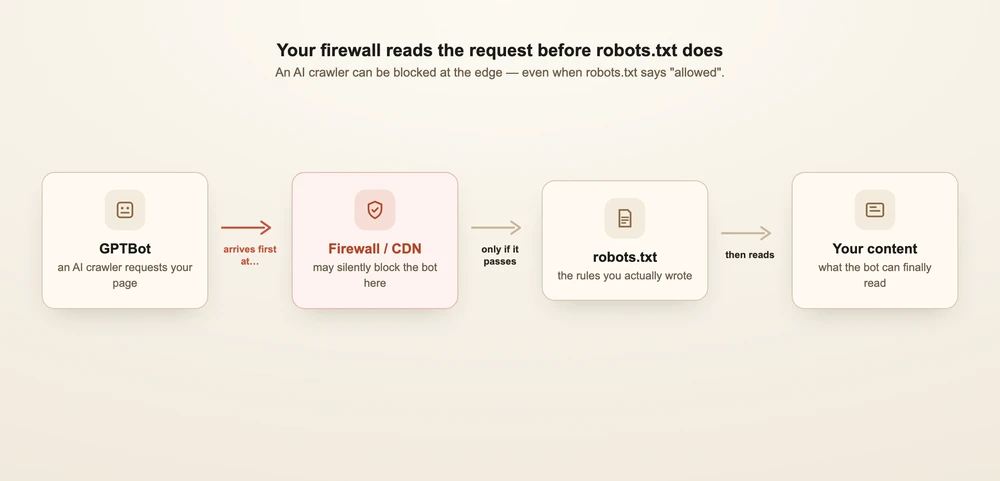
Here is a surprise that catches many owners. Your robots.txt can say "welcome," while your firewall quietly turns AI crawlers away. The two can disagree.
Many sites use a delivery network or firewall, like Cloudflare, to block bad bots. These tools can block AI crawlers too, often by default. When that happens, the crawler gets an error and never reads your page. Your robots.txt never even comes into play. So you may believe you allow AI, while the front gate is locked.
The fix is to allow the AI crawlers in two places, not one. Allow them in robots.txt. Then allow, or "whitelist," the same crawlers in your firewall or delivery network's bot settings. Only then can they truly get in.
What two lines help every crawler?
Two simple additions help AI crawlers find and understand your whole site. Add both.
The first is a sitemap line. Add Sitemap: https://yourdomain.com/sitemap.xml to your robots.txt. A sitemap is a list of all your pages. AI crawlers use it to find pages buried deep in your site. Without the pointer, they may never reach those pages, let alone cite them.
The second is an llms.txt file. This is a plain-language guided tour of your site, written for AI systems. It helps them understand what you offer and where to look. See what is llms.txt and how to create one for the full how-to.
A sensible default robots.txt you can copy
Here is a complete robots.txt that follows every suggestion above. It allows the live-search and platform crawlers, marks training bots as your own choice, blocks Bytespider, and points to your sitemap. Copy it, swap in your real domain, and hand it to your developer if needed.
# Allow the live AI search crawlers
User-agent: GPTBot
Allow: /

User-agent: OAI-SearchBot
Allow: /

User-agent: ChatGPT-User
Allow: /

User-agent: ClaudeBot
Allow: /

User-agent: PerplexityBot
Allow: /

# Allow the platform AI crawlers
User-agent: Google-Extended
Allow: /

User-agent: Applebot-Extended
Allow: /

User-agent: Amazonbot
Allow: /

User-agent: FacebookBot
Allow: /

# Training-only crawlers — your policy choice.
# Change "Allow" to "Disallow" if you prefer to opt out.
User-agent: CCBot
Allow: /

User-agent: anthropic-ai
Allow: /

# Block the aggressive crawler (most Western sites)
User-agent: Bytespider
Disallow: /

# Default for every other crawler
User-agent: *
Allow: /

# Point crawlers to your sitemap
Sitemap: https://yourdomain.com/sitemap.xml
The goal of this file is simple. Every major bot is addressed on purpose. Access becomes a policy you chose, not an accident you never noticed.
How do you check it actually works?
Setting the file is step one. Step two is proof. Run these quick checks after any change.
- Re-fetch the file. Visit
yourdomain.com/robots.txtin your browser and read it. Make sure your new rules are live. - Run it through a validator. A free robots.txt checker will flag broken lines before they cause harm.
- Check your logs or analytics. Look for the bot names, like GPTBot and ClaudeBot, in your server logs or delivery-network reports. That shows who is really getting in.
- Re-test after firewall changes. Your robots.txt and your firewall can disagree. So test again any time bot settings change.
The lesson is to trust the live result, not just the file. The file says what you intend. Your logs say what truly happens.
Our visibility audit builds a complete access map of more than fourteen AI crawlers, including firewall-level blocks your robots.txt cannot show you. It flags any accidental lockout as a Critical finding, so you can fix it before it costs you.
Frequently asked questions
Does blocking GPTBot in robots.txt stop ChatGPT from reading my site? It stops ChatGPT's search crawler, GPTBot, from indexing your pages. But it does not stop ChatGPT-User, the separate bot that fetches a page when a user shares your link. To control both, address each by name in your robots.txt.
Should I block AI crawlers to protect my content? For most businesses, no. Blocking live-search crawlers like GPTBot and ClaudeBot makes you invisible in AI search, with little upside. Training-only crawlers are a fair values call. Bytespider is the one we suggest blocking for most Western sites.
Will blocking Google-Extended hurt my Google rankings? No. Google-Extended controls only AI training for Gemini and AI Overviews. Your normal Google ranking comes from a different crawler, Googlebot, which Google-Extended does not touch.
Is robots.txt a way to keep crawlers out for good? No. A robots.txt file is a voluntary convention under RFC 9309. Well-behaved crawlers honor it, but it enforces nothing. For true blocking, use your firewall or server, not robots.txt alone.
Why can AI crawlers still be blocked when my robots.txt allows them? Your firewall or delivery network may block bots on its own, before robots.txt is read. So allow AI crawlers in both your robots.txt and your firewall settings.
The bottom line
One small file decides whether AI tools can read and quote your website. Start by checking that no leftover rule blocks everyone. Then allow the live-search crawlers like GPTBot, ClaudeBot, and PerplexityBot. Make training bots a choice you make on purpose. Check your firewall, not just the file. And add a sitemap line so crawlers find every page.
The aim is for access to be a policy, not an accident. To learn how crawler access fits the bigger picture, read what is GEO and should you allow AI crawlers. Want the deeper dives? Read the per-bot guides on OpenAI's three crawlers, ClaudeBot, PerplexityBot, Google-Extended, CCBot, and Bytespider. For the basics, see robots.txt explained and whether AI crawlers see your JavaScript.
Run a free visibility audit to see exactly which AI crawlers can reach your site, and which are locked out by accident.