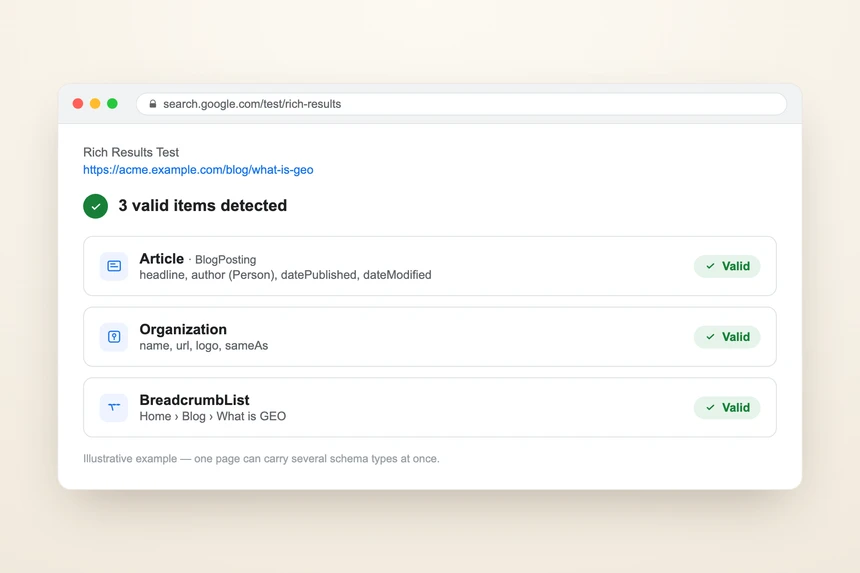
This schema markup guide explains structured data in plain English. Structured data is code that describes your page to machines. It states plain facts in a standard vocabulary: this is a company called X, here is its logo, here is its phone number. Visitors never see it. Search engines and AI assistants read it directly to understand who you are.
You keep seeing "schema markup" in audit reports. This guide tells you what it is, which types your site needs, and the rules that make it valid. It also routes you to a deep dive for each schema type. You will not need to write code yourself. You will know enough to brief a developer.
What is structured data?
Structured data is a machine-readable business card hidden in your page's code. It does not change what a human sees. It tells machines the facts behind the page, in a vocabulary every search engine and AI understands.
Think of a normal web page. A person reads "Acme Corp, founded 2014, call us at 555-0100." A machine sees only text. It has to guess what each word means. Structured data removes the guessing. It labels the facts: this is the company name, this is the founding year, this is the phone number.
Why does this matter twice over now? Two reasons:
- Search engines use it to build richer listings, like star ratings or event dates.
- AI assistants read it directly to understand your business as an entity. Google's Gemini leans on structured data for this more than other platforms.
So structured data helps you in classic search and in AI answers. That is rare. Most tactics help one or the other.
What is JSON-LD?
JSON-LD stands for JavaScript Object Notation for Linked Data. Just call it the modern format for structured data. It is a self-contained block of code that sits inside a <script type="application/ld+json"> tag. That block can live in the page head or body. It is invisible to readers.
One rule matters above all. The JSON-LD must describe content that is genuinely on the page. You cannot use it to claim things visitors never see. Google can penalize markup that contradicts the visible page.
Here is a minimal Organization block. You can skip the code and keep reading.
{
  "@context": "https://schema.org",
  "@type": "Organization",
  "name": "Acme Corp",
  "url": "https://www.acme.com",
  "logo": "https://www.acme.com/logo.png",
  "sameAs": [
    "https://www.linkedin.com/company/acme",
    "https://en.wikipedia.org/wiki/Acme_Corp"
  ]
}
That small block tells any machine the facts. This is a company. Here is its official site, its logo, and its trusted profiles.
JSON-LD vs Microdata vs RDFa: which format won?
JSON-LD is the format you want. It is the one Google prefers, and the one AI crawlers read most reliably.
There are three "dialects" of structured data. They all say the same facts in different ways:
| Format | Where it lives | The analogy |
|---|---|---|
| JSON-LD | A single script block in the code | A clean index card tucked into the page |
| Microdata | Attributes woven into visible HTML | Sticky labels stuck on the furniture |
| RDFa | Attributes mixed into the HTML | Another label system, less common |
JSON-LD wins because it is self-contained. It sits in one place, separate from your design. The older formats tangle the labels into your visible content. That makes them fragile and easy to miss.
Our visibility audit scores 5 points for JSON-LD, 3 for a mix, and 0 for the old formats alone. (Those points are from our own scoring rubric.) Legacy-only markup gets flagged as a high-priority fix. AI crawlers process JSON-LD most reliably. Markup in older formats may simply be skipped.
For a full side-by-side, see JSON-LD vs Microdata vs RDFa: which structured data format to use.
The foundation: Organization schema and sameAs
Every website needs two things first: Organization schema and the sameAs property. They tell AI systems what your business is and where to find your trusted profiles.
Organization schema is the single most important machine signal about your company. It carries your name, url, and logo, plus recommended extras like description, foundingDate, founder, address, and contactPoint. Without it, an AI has to guess who you are from your prose. See how to add Organization schema to your website for the step-by-step.
The sameAs property lists links to your profiles on other sites: Wikipedia, Wikidata, LinkedIn, YouTube, and so on. It ties your brand's identity together across the web. This is the single most important structured-data property for getting cited by AI. Read the sameAs property: linking your brand entity across the web.
Two extra properties are worth naming for AI:
- knowsAbout lists the topics your company is an authority on. Give it three or more. It tells AI systems what subjects you can speak to.
- tickerSymbol marks a public company's stock symbol, with its exchange prefix. It helps AI describe listed firms correctly.
Which content schemas do blogs and teams need?
Blogs need Article and Person schema. Team pages need Person schema. Inner pages benefit from BreadcrumbList. These types build the trail of expertise that AI follows.
Article schema marks up a blog post or news story. It needs headline, datePublished, dateModified, author, publisher, and image. Pick the right subtype: NewsArticle for press releases, BlogPosting for blog content. The dateModified field is a key freshness signal, which Perplexity especially watches. See Article schema for blog posts: the complete guide.
Here is a minimal Article block. Again, you can skip it.
{
  "@context": "https://schema.org",
  "@type": "BlogPosting",
  "headline": "JSON-LD structured data: the complete schema markup guide",
  "datePublished": "2026-06-19",
  "dateModified": "2026-06-19",
  "author": { "@type": "Person", "name": "Andreas Luksch" },
  "publisher": { "@type": "Organization", "name": "Acme Corp" },
  "image": "https://www.acme.com/cover.png"
}
The author must be a real Person, with a credible full name. It must not be a content management system (CMS) login like "Admin." A CMS is the tool you use to publish your site. Ideally the Person also has url, sameAs, jobTitle, and worksFor.
Person schema on team pages builds your expertise graph. Mark up each person with jobTitle, worksFor, and any credentials. See Person schema: marking up your team for AI visibility.
BreadcrumbList schema mirrors the "Home > Products > Shoes" trail in code. Each step gets a position number, counted in order. One out-of-order number can break the whole block. See BreadcrumbList schema: a practical guide.
Which business-type schema does your site need?
Your site also needs the schema that matches your business type. Our audit awards up to 10 points for the right one. (That figure is from our scoring rubric.) Here is the match-up:
| Your business | The schema | Key facts it carries |
|---|---|---|
| Local shop or service | LocalBusiness | address, telephone, opening hours |
| Online store | Product | name, image, price, availability, brand |
| Software company | SoftwareApplication | category, platform, price, features |
| Events or webinars | Event | name, start date, location, organizer |
LocalBusiness feeds your hours and location to AI answers, especially Gemini's. Without it, an AI may give a customer the wrong hours. Pick the narrowest subtype that fits, like Restaurant or Dentist. Fall back to plain LocalBusiness only if none applies. See LocalBusiness schema: the complete guide.
Product powers AI shopping answers. They pull price and stock straight from this markup. See Product schema for e-commerce: the complete guide.
SoftwareApplication gives AI a clean inventory of what your tool does. Note: only the name plus one of offers, review, or aggregateRating is strictly required. The applicationCategory and operatingSystem fields are recommended, not required. See SoftwareApplication schema for SaaS companies. (SaaS means software you rent online instead of installing.)
What are speakable and SearchAction schema?
These are two niche properties worth knowing. The speakable property points an AI to your best passage to read aloud. The SearchAction property tells machines your site has its own search box.
speakable points CSS selectors at your one or two strongest passages. In effect it says: if a voice assistant reads anything aloud, read this part. It hands AI your preferred quote on a platter. See what is speakable schema and should you use it?.
SearchAction on your homepage describes your internal search feature. Treat it as a minor nicety, not a priority. The search-box result it once powered is largely retired.
You can also mark up media. ImageObject describes a logo or hero image, with its URL and size. VideoObject describes an embedded video. Both help machines display and attribute your media correctly.
What validation rules make or break schema markup?
Invalid schema is silently ignored. Search engines and AI just skip it. So all your effort yields nothing. A few rules cause most failures.
| Common error | What it looks like | The fix |
|---|---|---|
| Missing context | No @context line |
Always start with "@context": "https://schema.org" |
| Wrong type name | "localbusiness" or "LocalBiz" | Use the exact name: "LocalBusiness" |
| Wrong data type | A logo URL as plain text | Wrap it correctly; keep ratings numeric |
| Leftover placeholders | "[Company Name]" or "Lorem ipsum" | Replace with real values |
| Relative URLs | "/logo.png" | Use the full address with https:// |
| Bad dates | "June 19, 2026" | Use the date format YYYY-MM-DD |
A missing @context line invalidates the whole block. So does a misspelled type. Missing required fields fail too: Article needs headline, datePublished, author, publisher, and image. One stray comma can corrupt the entire block, like a damaged file.
Two free tools catch these problems: the Schema.org Validator and Google's Rich Results Test. For the full fix list, see how to validate your schema markup (and fix common JSON-LD errors).
Why must schema be server-rendered, not JavaScript-injected?
Your JSON-LD must be in the page's raw code, not added later by browser scripts. Many AI crawlers never run those scripts. Anything added afterward is invisible to them.
There are two ways code reaches a page. It can be baked into the HTML the server sends. Or it can be added afterward by scripts in the browser. The first way is reliable. The second is risky.
Our audit scores 10 points for JSON-LD in the source code. It scores 5 if scripts inject it into the head, and 0 if scripts inject it dynamically. (These points are from our rubric.) Google's December 2025 guidance warns that script-injected structured data may be processed late. That especially hurts time-sensitive types like Product and Offer.
The fix is simple to brief: generate the JSON-LD at the server or build step. For the deeper picture, see can AI crawlers see your JavaScript website? SSR for AI search.
Which schema types did Google retire?
Google has retired several rich results. Old advice still lists them. Using dead markup signals a neglected site, so it pays to know what changed.
- HowTo rich results were removed in September 2023.
- FAQ rich results were fully deprecated on 7 May 2026. They no longer show for any site. The older "restricted to government and health sites" line is now obsolete.
- A 2025 cull retired several more, including SpecialAnnouncement, ClaimReview, CourseInfo, EstimatedSalary, LearningVideo, and VehicleListing.
- PracticeProblem rich results ended in January 2026.
One nuance on FAQ: AI platforms still parse FAQ content. So keep your visible FAQ section. You just will not earn a Google rich result from it. The same goes for HowTo content.
Do not trust any hard-coded "complete list" of supported types, including this one. The list changes often. Check the live source: Google's Search Gallery (as of 2026; confirm against the Search Gallery at publish — this list changes). For more, see deprecated schema types: what Google retired and what to do. Also see Google rich results: which schema types actually earn them.
Which schemas does your site actually need?
Most sites need a small, predictable set. Match your site type to the list below, then add the niche types only if they apply.
| Site type | Schema to ship |
|---|---|
| Every site | Organization + sameAs + BreadcrumbList |
| Blog or magazine | Article + Person |
| Local business | LocalBusiness |
| Online store | Product |
| Software company | SoftwareApplication |
Every missing schema is a missed chance. You miss a richer search listing, and you miss feeding AI precise, quotable facts. For the full decision framework, see which schema types does your website actually need?.
Our visibility audit detects every schema block on your site. It validates each one against the current rules, including the 2023 to 2026 deprecations that most plugins missed. Then it generates ready-to-paste JSON-LD for the types you are missing.
Frequently asked questions
Do I need to know how to code to use schema markup? No. You need to understand which schema types your site should carry and why. A developer or your CMS can add the JSON-LD. This guide gives you enough to write the brief.
Is JSON-LD better than Microdata? Yes, for almost everyone. Google prefers JSON-LD, and AI crawlers read it most reliably. It also keeps the markup separate from your design, so it is easier to maintain. The older formats may be skipped.
Will schema markup help me get cited by AI? It improves the odds. Structured data tells AI systems what your business is and what facts to trust. It is not magic on its own. It works alongside good content and a clean technical setup, not instead of them.
What is the single most important schema to add first? Organization schema with the sameAs property. It is your entity's home base. It states who you are and links you to the profiles search engines and AI already trust.
Does invalid schema hurt my site? It mostly wastes your effort, because machines silently ignore invalid blocks. Markup that contradicts your visible content is worse and can draw a penalty. Always validate before you publish.
The bottom line
Structured data is the invisible layer that tells machines what your business is. JSON-LD is the format to use. Start with Organization schema and sameAs, add the schema that matches your business type, and keep every block valid and server-rendered. Skip the types Google retired, and check the live Search Gallery before you publish.
Schema is one of the few tactics that helps both classic search and AI answers. It is also mostly template-level work, so a developer can do it once and reuse it. This page is the hub; each linked guide is the deep dive.
The first step is knowing what your site already has. Run a free visibility audit to see every schema block on your site, what is valid, and what to add next.